Key takeaways
- WordPress runs a large share of the web, from personal blogs to museums and major publications. Its reputation for looking generic comes from how sites are built, not from what it can do.
- Since WordPress 5.9 in January 2022, block themes let you control colours, type, spacing and every template visually, in the Site Editor.
- Choose a theme designed for your type of site. It decides more of the final look than any setting you change later.
- Set global styles once, build pages from patterns, and resist adding a different look to every page.
- Most “cheap-looking” WordPress sites suffer from the same few problems: stacked plugins, inconsistent spacing, stock imagery and default content nobody replaced.
WordPress has an image problem among designers. Mention it and people picture a blog with a sidebar, a stock photo slider and a footer full of widgets. That picture is out of date. According to W3Techs, WordPress powered 39.5 percent of all websites in November 2026, and 58.2 percent of sites whose content management system is known. Among them are some of the most carefully designed sites on the web.
The official WordPress Showcase lists museums, magazines, game studios and one of the world’s best-known restaurants. Designmuseum Danmark opens on a full-bleed photograph of a bentwood chair with the museum’s name in heavy capitals. The Atavist Magazine presents its long-form stories like book covers. Noma keeps its first screen to a photograph, its wordmark and a single “Book a table” link. None of them looks like a template.
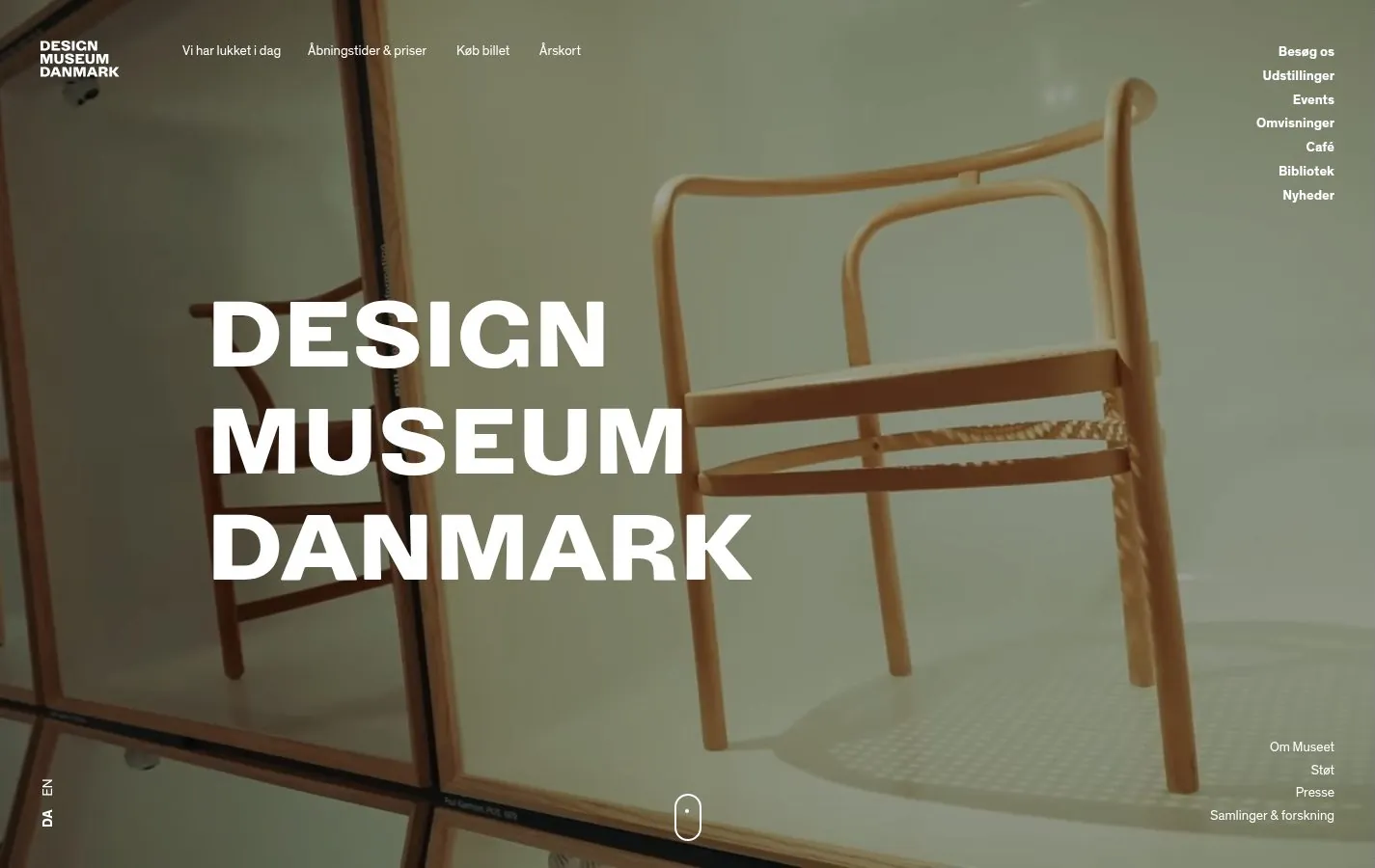
This guide explains how to get that kind of result without writing code: what changed in WordPress, how to choose a theme, how to use styles and patterns, and the habits that make WordPress sites look cheap.
What changed: block themes and the Site Editor
For most of its history, a WordPress theme was a set of PHP templates. Changing anything beyond colours and a logo meant editing code or adding a page builder plugin on top. That is where many generic and bloated WordPress sites came from.
WordPress 5.9, released on 25 January 2022, introduced full site editing and block themes. In a block theme, every part of the site, the header, the footer, the templates for posts and pages, is made of the same blocks you use in the editor. Colours, typefaces, sizes and spacing live in one place, the theme’s global styles, and you change them visually in the Site Editor. Twenty Twenty-Two was the first default theme built this way.
For design, the important change is consistency. When styles are global, a change to the heading font or the accent colour reaches every page at once, and the site stays coherent as it grows.
Step 1: Choose a theme made for your type of site
The theme decides more of the final look than anything you do afterwards. It sets the layouts available, the type scale, the spacing rhythm and the templates for archives and single posts. Trying to turn a magazine theme into a portfolio, or a blog theme into a store, is the most common reason WordPress sites end up fighting their own structure.
So start from the job. A publication needs strong article and archive templates. A software company needs pricing, feature and changelog layouts. A directory needs listings, categories and filters. A portfolio needs a project template that gets out of the way of the work. Look at the theme’s demo with your own kind of content in mind, and check how inner pages look, not just the home page.
A disclosure, since it is relevant here: I make WordPress themes, under the name The Web Architecture, and you can see them at powerfulwpthemes.com. Each one is designed for a single kind of site. This site, for example, runs on Tessera, the one designed for directories and galleries. I mention them because they follow the approach in this guide, not because they are the only good option.
Step 2: Set global styles before you build pages
Before you create a single page, set the global styles in the Site Editor:
- Typography. Choose the body and heading fonts, and set the body size for comfortable reading on a phone. Most good block themes come with a few tested combinations.
- Colour. Set a background, a text colour, one or two brand colours and one accent for buttons and links. Check contrast between each pair.
- Spacing and layout. Set the content width and the spacing scale, so every block sits on the same rhythm.
Many themes include style variations, alternative sets of colours and type you can switch between in one click. They are a good way to find a direction quickly before you fine-tune.
Step 3: Build pages from patterns, not from scratch
Patterns are ready-made arrangements of blocks: a hero, a pricing table, a team grid, a call to action. Good themes include patterns designed to work with their styles. Building pages from them keeps spacing, type and colour consistent, and it is much faster than arranging blocks by hand.
Save your own patterns for anything you repeat, such as a newsletter box or a product highlight. Synced patterns update everywhere when you change them once.
Step 4: Replace everything that came from the demo
The fastest way to spot a WordPress site built in a hurry is demo content that survived: placeholder text, sample testimonials, stock photos that came with the theme. Replace every image with your own, rewrite every line, and delete sections you do not need rather than leaving them half-filled.
Step 5: Keep the plugin list short
Every plugin can add its own styles, scripts and interface elements. A site with a page builder, two slider plugins and a popup tool often ends up with several competing design systems on one page. With a good block theme, most visual needs are covered by core blocks and patterns. Add plugins for functions, such as forms, search or ecommerce, and choose ones that respect the theme’s styles.
What makes WordPress sites look cheap
When a WordPress site looks generic, the cause is usually one of a few habits:
- Inconsistent spacing. Blocks with different margins on every page. Global spacing settings fix most of this.
- Too many fonts and colours. Each page styled separately, until the site has six greys and four blues.
- Stock imagery. Photos that could belong to any company.
- Leftover widgets and sidebars. Archives, tag clouds and calendars nobody uses.
- Slow pages. Heavy sliders and unoptimised images that make the first screen appear late.
Each of these has its own article in this guide as they are published.
When to get help
You can get a well-designed WordPress site on your own with a good block theme and some patience. Get help when the site is central to your business, when you need features no theme provides, or when you would rather spend the time on your own work. If you want a standard WordPress site set up in your own name without building it yourself, that is what NoTiesBuilder, which I also make, is being built to do. It is not open yet; the waiting list is at notiesbuilder.com.
Whatever route you take, the principles in the other guides still apply: web design elements, how to design a website and inspiration by type are all platform-independent.
Frequently asked questions
Can WordPress sites look as good as custom-coded sites?
Yes. Many sites in the official WordPress Showcase, including museums and major publications, are as distinctive as any custom build. The difference comes from design decisions and discipline, not from the platform.
Do I need a page builder to design a WordPress site?
Not with a modern block theme. The Site Editor handles layout, templates and global styles. Page builders still have uses, but stacking one on top of a block theme often adds weight and a second design system.
What is the difference between a block theme and a classic theme?
A classic theme uses PHP templates and the Customizer, so changing structure usually means code. A block theme builds every template from blocks and stores styles in one place, so you can change headers, footers, templates and styles visually.
Will changing my theme break my design?
It can. Content usually survives, but layouts, patterns and styles specific to the old theme may not. Test a new theme on a copy of the site first, and keep content free of theme-specific shortcodes where you can.
Is WordPress free?
The software is free and open source. You pay for hosting, a domain and any premium themes or plugins you choose.
Sources
- W3Techs, “Usage statistics and market share of WordPress,” data of 1 November 2026. w3techs.com
- WordPress.org, “WordPress 5.9” release documentation. wordpress.org
- WordPress.org, “Showcase.” wordpress.org
Articles in this guide
The first articles in this guide are on their way.